How to Make a Click Track From Your Own Backing Track, Without a DAW
· 7 min read
Every band that plays to tracks has one song like this. It was recorded live, or bounced from a rehearsal, or bought as a backing track that breathes a little. It has no click, and the drummer wants one. Making that click used to be the most tedious job in the whole setlist. As of this week it takes about a minute in CountIn.
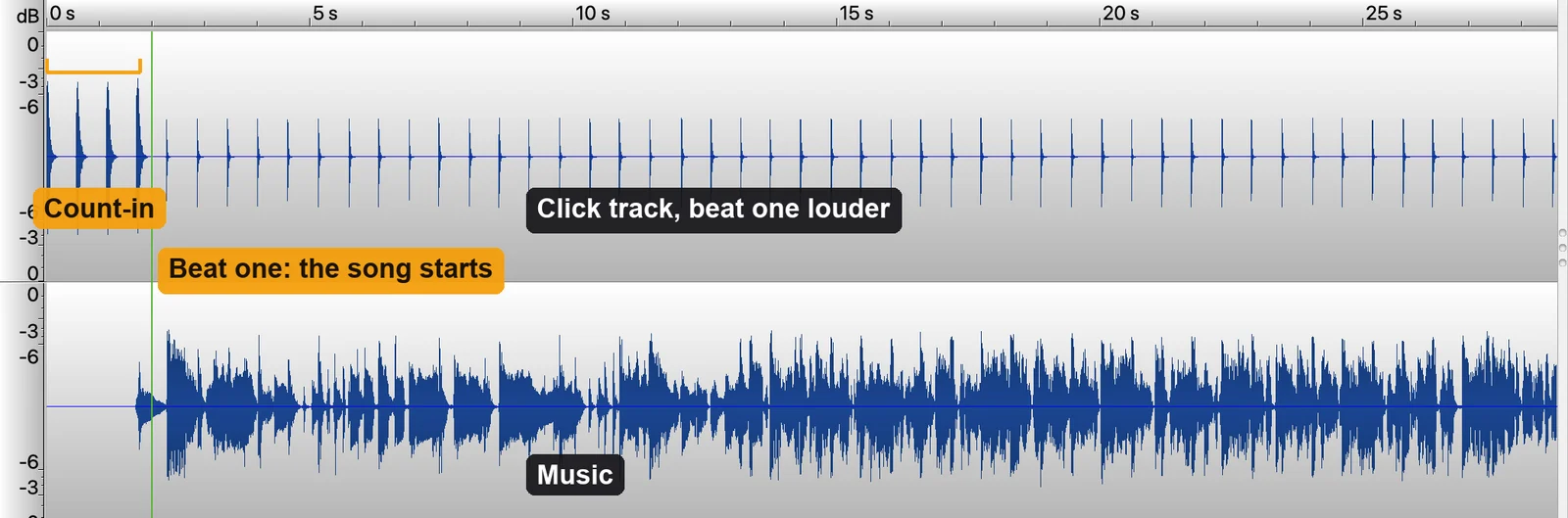 What the exported file holds: the left channel carries the count-in and the click through the whole song, the right channel carries the music in mono. Beat one is where the count-in ends and the song starts.
The job nobody wanted
A click track is a metronome that runs through the whole song, into the drummer's ears, so the band and the track stay locked. If the song was produced to a click, making one is trivial: type the tempo, line up the start, done.
The problem is every other song. A recording that was not made to a click drifts. Not much, a few beats per minute over a chorus, a stretch in the bridge, a fill that pushes. A fixed metronome set to the average tempo is on the beat for sixteen bars and then it is not, and a drummer fighting a click that has wandered off the track is worse off than with no click at all.
The standard fix is tempo mapping in a DAW. Open the song in Ableton or Logic, find every beat, and drag the tempo curve to match, section by section or beat by beat. MultiTracks' own guide for Ableton warns you never to use ramps and never to map the count-in. Logic's Smart Tempo helps, then asks you to correct it by hand. Fifteen minutes on a good day, an hour on a bad one, and it needs a DAW and someone in the band who knows how to use it. There are whole courses that teach exactly this.
That is the hour CountIn now does for you.
What CountIn does instead
CountIn listens to the recording and finds the beats themselves, all of them, from the first hit to the last. Not an average tempo: the actual grid of the performance, where every beat lands. The click is then placed on those beats, so where the song pushes, the click pushes with it, and where it settles, the click settles.
The same grid already drives the count-in and the intro clicks, which is why the count-in, the intro and the click line up with each other: one set of beats, one file.
Set it like a drummer would
Drummers do not want a generic beep. In the CLICK section you get what a drummer sets on a metronome:
- Beat one tuned higher. The first beat of every bar is the same sound pitched up, from a little to an octave, so the bar line is audible without looking.
- Woodblock or sticks. A short, dry hit with a hard attack, the sounds drummers actually run in their ears. No reverb, no hi-hat wash.
- Click volume against the song, and a preview that plays the click over the music so you can scrub to any part of the song and hear it sit.
It always exports as Split
A click through the whole song only makes sense where the audience cannot hear it. So a track with the click on always exports in the two-channel format bands already use: click and count-in on the left channel, the song in mono on the right. Left goes to the drummer's in-ears, right goes to the PA. A Y cable or two mixer channels, and the room never hears a tick. How the split file works and how to wire it is covered in its own article.
Because the click is in the file, it plays from anything: a phone, a laptop, a sample pad, a playback app. No app subscription, no tempo map to carry around, nothing to rebuild when the drummer changes.
How to make a click track in CountIn, step by step
- Drop in the track. MP3, WAV, M4A, FLAC or OGG. CountIn finds the tempo and beat one, and measures the beats of the whole song in the background.
- Turn the count-in on and check the marker sits on beat one. The click takes its bar lines from that marker, so if the marker is between beats, the app says so and you drag it.
- Turn CLICK on. Pick woodblock or sticks, tune beat one up, set the volume. Press play and scrub through the song: verse, chorus, the bridge where the tempo moves.
- Export. The file comes out as Split, click left, music right, with the count-in at the front.
Hearing the click on your own song is free, like everything else in the preview. Exporting it is the Click plan.
What to expect, honestly
The beat detection is measured, not guessed. On a public set of 698 annotated recordings it finds the tempo family in every one and lands beats within 10 ms of the human annotation. On full-length songs with real drums it agrees with a grid built from the drum stems alone in 27 of 30 cases. A handful of things still trip it up, and it is better to know them:
- Songs without a steady pulse. A rubato intro, a free-time breakdown, a fermata: there is no beat to follow, and the click will guess through it. Bands usually mute the click there anyway.
- Very fast metal and heavy shuffle. The grid holds, but beat placement can wobble by a frame. In a shuffle it is inaudible; at 200 BPM double-time it can be.
- 3/4 and 6/8. The click follows the beats, and beat one is tuned from the count-in marker, which assumes four beats to a bar. Three-four songs get a correct click with the accent in the wrong place for now.
If the click does not sit on a song, the app does not pretend it does: turn CLICK off and export the count-in as before.
Who this is for
The band whose tracks came from a rehearsal room, not a studio. The worship team with a backing track that was recorded live and drifts. The duo running tracks with a drummer who joined last month and wants a click on everything. Anyone who has ever opened a DAW at midnight to tempo map a song for tomorrow's gig.
Frequently asked questions
Is a click track the same as a count-in?
No. A count-in is the one or two bars before the song that end on beat one, so everyone starts together. A click track runs through the whole song, in the drummer's ears, to keep the band and the track locked. CountIn does both, from the same beats, in one file.
Can the audience hear the click?
Not if the left channel goes to the ears and the right channel goes to the PA. That is why a click track from CountIn always exports as Split. Feed both channels to the room and they will hear it, so route it.
Does it work on songs that were not recorded to a click?
Yes, that is the point. The click follows the recording's own beats, so it moves with the song instead of drifting away from it. The exception is music with no steady pulse at all.
Can I keep a fixed tempo instead?
The click follows the song by design. If the song was recorded to a click, the two are the same thing. If it was not, a fixed tempo is exactly what drifts.
What does it cost?
Hearing the click on your own track is free. Exporting it is the Click plan, $39 a year, or Lifetime, $79 once. The count-in and key change exports are the Stage plan, $19 a year. The tool itself lives at the click track maker page.
← Back to Blog · Click track · Free BPM finder · Tap tempo · Key changer