Click Track Maker: Add a Click Track to Any Song
A click track keeps the drummer and the band locked to the backing track. Most click track generators tick at one fixed tempo, which works only for songs recorded to a click. CountIn is a click track maker that builds the click from the song itself, so it follows the recording, tempo changes included, and bakes it into the file: click on the left channel, the song on the right, ready for in-ears and the PA.
Hearing it on your own track is free and needs no signup: drop the song in, turn the count-in on, turn CLICK on, press play.
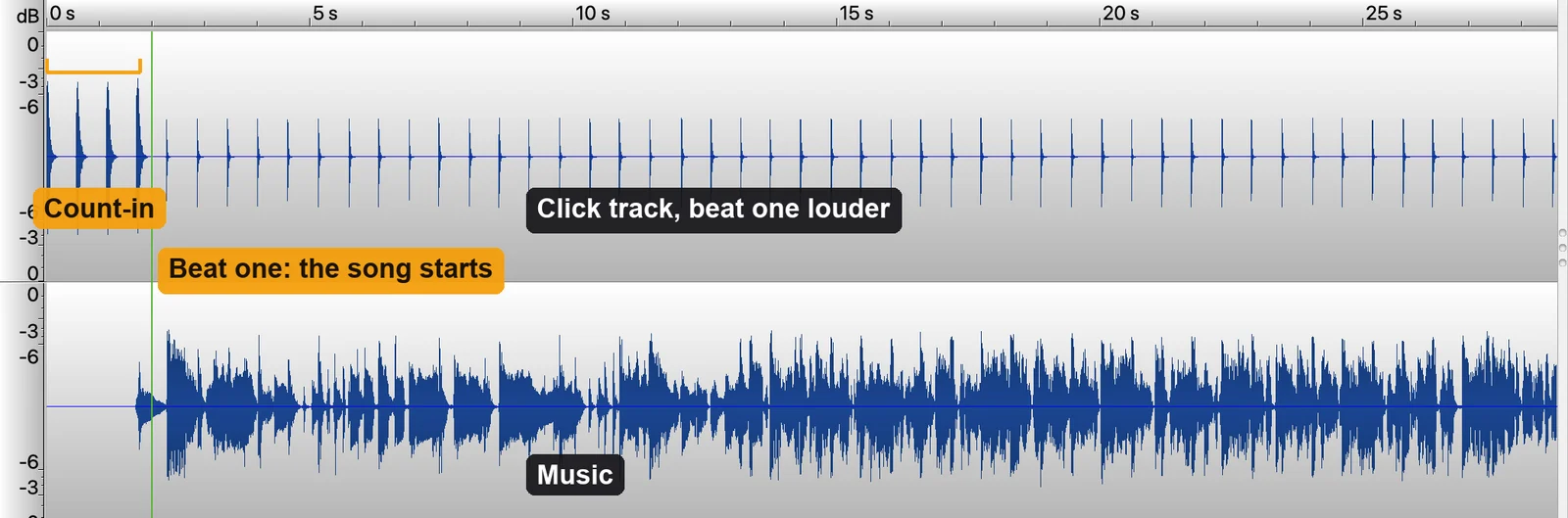
How it works
- Drop in your backing track (MP3, WAV, M4A, FLAC or OGG).
- Turn the count-in on and check that the marker sits on beat one.
- Turn CLICK on. Pick woodblock or sticks and tune beat one higher, the way a drummer sets a metronome.
- Play it back, scrub through the song, and export: click and count-in on the left, the song in mono on the right.
What makes this click different
Every click track creator has to answer one question: what happens when the song does not hold one tempo. This is how CountIn answers it.
It follows the song. A recording that was not made to a click drifts a few beats per minute over a chorus, and a fixed metronome drifts away from it. This click stays with the song from the first bar to the last.
It is in the file. No app to run on stage, no tempo map to carry around. The exported MP3 or WAV plays from a phone, a laptop, a sample pad or any playback app, with the click on its own channel.
The count-in comes from the same place. The count-in at the front and the click through the song never disagree, so the band starts on beat one and stays there.
Set like a drummer wants it. Beat one tuned higher, woodblock or sticks, click volume against the song. All of it audible in the preview before you export. How the click track works, and what it does not do yet.
Click left, music right
A click through the whole song only makes sense where the audience cannot hear it, so the export is always the two-channel file bands already use: the left channel carries the click and the count-in, the right channel carries the song in mono. Left goes to the in-ears, right goes to the PA. How the split file works and how to wire it.
Frequently asked questions
Does it work on a song that was not recorded to a click?
Yes, that is the point. The click follows the recording's own tempo, so it moves with the song instead of drifting away from it. Music with no steady pulse at all, a free-time intro or a fermata, is the exception: there is no beat to follow there.
Can the audience hear the click?
Not if the left channel goes to the ears and the right channel goes to the PA. That is why a click track from CountIn always exports as Split. Feed both channels to the room and they will hear it, so route it.
Is a click track the same as a count-in?
No. A count-in is the one or two bars before the song that end on beat one. A click track runs through the whole song. CountIn makes both, in one file.
What does it cost?
Hearing the click on your own track is free. Exporting it is the Click plan, $39 a year, or Lifetime, $79 once. The count-in and key change exports alone are the Stage plan, $19 a year.
What formats can I upload?
MP3, WAV, M4A, FLAC and OGG, which covers what music apps and DAWs export.
Can I change the key on the same file?
Yes. The key changer shifts the song up or down by up to 7 semitones with the tempo untouched, on the same export as the count-in and the click.