How to Add a Count-In to a Song on iPhone or Android
· 6 min read
A song with a count-in made on a phone: one bar of a spoken count, then the demo song Midnight by Smith Riff at 80 BPM.
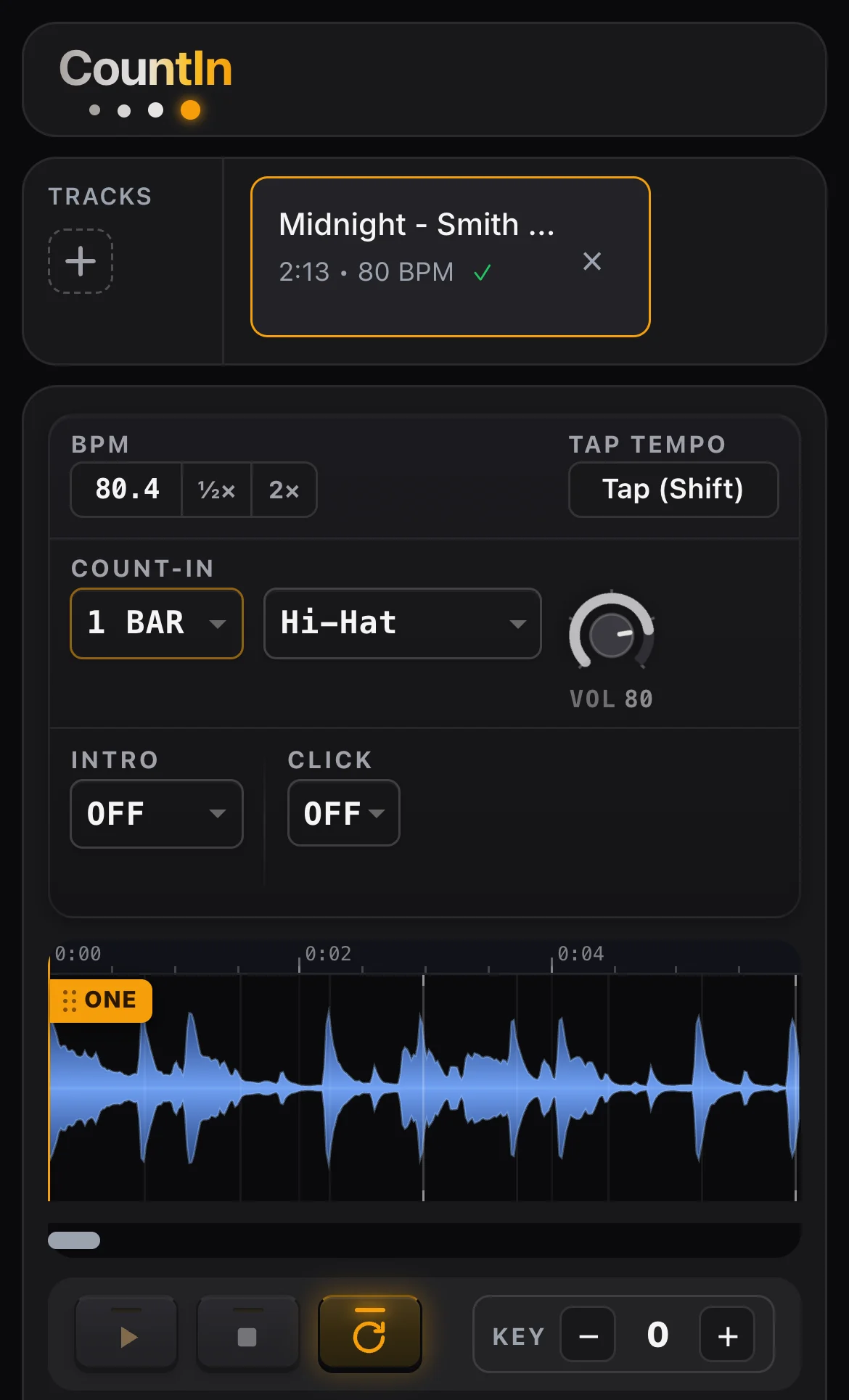
A count-in is the "1, 2, 3, 4" before the music, and on a phone the file that needs it sits in the Downloads folder. GarageBand reached the iPhone on 1 November 2011 with a metronome whose count-in, in Apple's words, "plays before recording starts"; it is an aid for the person recording, not a part of the song, and Spotify has no count-in at all: a musician asked for a "1 2 3 4" before a song on its community forum and the answer was "Currently there is no such feature." The steps below put the count into the file itself. They run in the phone's browser.
If the song is on your phone, hear CountIn count it in on beat one. Listening is free and needs no account.
Add the count-in in the phone's browser
| Step | On the screen | What happens |
|---|---|---|
| 1 | Safari or Chrome, the address countin.band | the editor opens; nothing is installed and there is no account |
| 2 | the plus under TRACKS | the phone's file picker opens; on an iPhone a downloaded song is, as Apple puts it, "in your Downloads folder in the Files app" |
| 3 | the file: MP3, WAV, M4A, FLAC or OGG, up to 100 MB and 20 minutes | the tempo is read from the recording and an orange marker, ONE, lands on beat one; it can be dragged |
| 4 | COUNT-IN: 1 BAR to 8 BARS | the length of the count |
| 5 | the list next to it: Hi-Hat, Open Hi-Hat, Sticks, Voice | the sound of the count; Voice says one, two, three, four |
| 6 | Play | the count, then the song, as often as needed, free |
| 7 | KEY, minus and plus | the song moves by up to 7 semitones; tempo and length stay |
| 8 | Export | an MP3 or WAV with the count in front of the song; the export is in the Stage plan, 19 dollars a year |
The exported file comes back as a download. In Safari "a Downloads button appears next to the search field", and on Android, Google's help page says, "To find all the files that you've downloaded to your device, open the Files app." The longer description of the same steps on a computer is in how to add a count-in to any backing track.
What the phone's own apps do with a count-in
| App | Its count-in, in the maker's words | In the saved file |
|---|---|---|
| GarageBand for iPhone | "a count-in that plays before recording starts"; "tap the Count In switch" | no: Apple describes it for recording only |
| Spotify | "Currently there is no such feature." | no |
| Stage Traxx 4, iPhone and iPad | "Plays the configured number of metronome clicks and then starts the song"; "Without a tempo there is no beat grid to count." | no: the app counts while it plays |
| Moises | 4 clicks on the free plan, up to 16 on paid plans, during playback | no: heard in the app |
| iReal Pro | "Auto gives two measures above 140 bpm and one below." | for its own generated backing, not for a recording |
| CountIn, in the browser | 1 to 8 bars of hi-hat, sticks or voice, ending on beat one | yes: MP3 or WAV |
A count that lives in the file plays from the Files app, a music player, a setlist app or a laptop alike, because nothing has to count at the moment of playing.
How long the count lasts
One bar of four beats lasts 240 divided by the tempo in beats per minute.
| Tempo | One bar | Two bars |
|---|---|---|
| 60 BPM | 4.00 s | 8.00 s |
| 80 BPM | 3.00 s | 6.00 s |
| 100 BPM | 2.40 s | 4.80 s |
| 120 BPM | 2.00 s | 4.00 s |
| 140 BPM | 1.71 s | 3.43 s |
| 180 BPM | 1.33 s | 2.67 s |
From the phone to the speakers
| Phone | Output | Date |
|---|---|---|
| iPhone 6s and older | 3.5 mm headphone jack | |
| iPhone 7 to iPhone 14 | Lightning; the iPhone 7 was among "the first iPhones not to feature a 3.5mm headphone jack" | announced 7 September 2016 |
| iPhone 15 and newer | USB-C, "the first iPhones to replace the Lightning port with a USB-C port" | on sale 22 September 2023 |
Apple put a Lightning to 3.5 mm adapter in the box of each iPhone 7 and stopped doing so on 12 September 2018; its current part for the newer phones is named USB-C to 3.5 mm Headphone Jack Adapter.
What the phone screen leaves out
| Feature | On a phone | On a computer |
|---|---|---|
| Count-in, sound, key, export | yes | yes |
| SECTIONS, the voice that names verse and chorus | not shown on a screen under 600 pixels on its short side | yes |
A click through the whole song is a second switch in the same editor, CLICK, described on the page of the click track generator.
Frequently asked questions
Does GarageBand on iPhone add a count-in to the exported song?
Apple's guide describes the count-in in one place, the metronome settings, as something that "plays before recording starts". The same guide has a switch named Visual Count-in, and "When the visual count-in is turned on, the metronome displays the beat of the count-in."
Is there an app to install?
No. CountIn is a web page; it opens in Safari on an iPhone and in Chrome on Android, and the song is picked from the phone's files.
Where is the file after the export?
On an iPhone, in the Downloads folder of the Files app, or in iCloud Drive if Safari is set to "save downloads to the Downloads folder in iCloud Drive". On Android, in the Files app.
How many bars of count-in does a band need?
CountIn offers 1 to 8. At 120 BPM one bar is 2 seconds and two bars are 4.
Sources
- Apple Support: Change song settings in GarageBand for iPhone; Where to find downloads on your iPhone or iPad (17 December 2025); Customize your Safari settings on iPhone.
- Apple Newsroom, GarageBand Now Available for iPhone and iPod touch Users, 1 November 2011.
- Google Chrome Help, Download a file, Android.
- Spotify Community, the thread "Count in on a song".
- Stage Traxx 4 manual, Song Details; iReal Pro help, Count-in; Moises help centre, read 17 November 2026.
- Wikipedia: iPhone 7; iPhone 15.
If the song is on your phone, hear CountIn count it in on beat one. Listening is free and needs no account.
← Back to Blog · Click track · Free BPM finder · Tap tempo · Key changer