Backing Tracks at Different Volumes? Fix the Whole Set at Once
· 4 min read
Every gigging musician knows this moment. Song three ends, you hit play on song four, and it's twice as loud. The sound engineer lunges for the fader, the front row winces, and you make a mental note to "fix the levels someday".
It happens because a setlist is almost never born in one place. One track came from a producer, one from an online store, one you bounced yourself years ago, one a bandmate sent over WhatsApp. Each was mastered to a different loudness, and side by side on stage the differences are brutal.
Why you can't fix it by ear
The obvious move is to open each file, listen, and nudge volumes until they feel equal. Two problems. First, your ears adapt within seconds, so "equal" drifts as you work through the list. Second, peak meters lie: two files can peak at the same level and still sound wildly different in loudness, because loudness lives in the average energy, not the highest spike.
That's why broadcast and streaming settled on a measurement that models how ears actually perceive level: LUFS (loudness units relative to full scale). One number for the whole track. Spotify and most streaming platforms level everything to around -14 LUFS, which is why an album from 1975 and a single from last year play back at the same volume in a playlist.
What CountIn now does about it
CountIn exports can now be normalized to that same standard, automatically. When the Normalize loudness (-14 LUFS) switch is on (it's on by default), every track you export lands at the same perceived level. Export your whole set and it comes out even, no matter where the files came from.
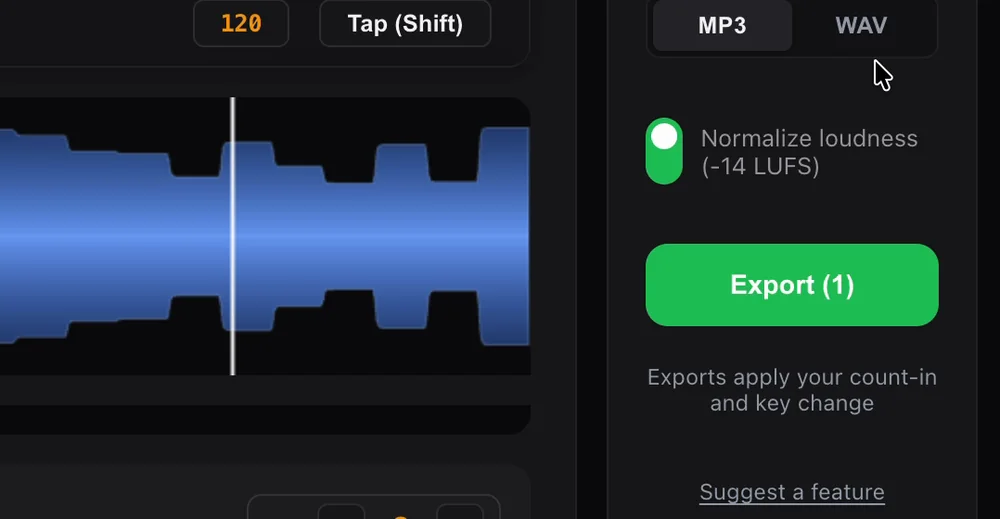
One switch, and it stays on unless you turn it off. There is nothing to set per track.
A few details that matter for sound quality:
It's pure gain, nothing else. No compression, no limiting, no changes to the dynamics of your mix. The whole file is turned up or down by one fixed amount, like moving a fader once and leaving it alone. If your track breathes, it still breathes.
The count-in scales with the music. The count-in you dialed in (and the key change, if you made one) is part of the file before normalization runs, so the click-to-music balance you chose stays exactly as you set it.
It never clips. If a very quiet, very dynamic track would need more gain than its peaks allow, CountIn stops at a safe ceiling instead of distorting. The track lands as close to the target as it can, clean.
You can switch it off. If you've already leveled your set by hand, or your engineer wants the original files, flip the switch off and your track's level is untouched.
What changes on stage
The engineer sets the level once at soundcheck and it holds for the whole set. Your in-ears stay consistent between songs, so the count-in that leads you in sounds the same on track one and track nine. And nobody in the audience gets blasted because song four came from a louder master than song three.
It's one of those things you stop thinking about the moment it works, which is the point. Setting levels is one step in getting a backing track ready for live performance, and mixing tracks at wildly different volumes is one of the common backing track mistakes that's now fixed by default.
Frequently asked questions
What is -14 LUFS in plain terms?
It's the loudness standard streaming platforms level music to. LUFS measures how loud a track feels over its whole length, not how high its loudest spike is. Two files at -14 LUFS sound equally loud side by side, which is exactly what you want across a setlist.
Does normalization change how my track sounds?
No. It applies one fixed gain to the whole file, like a single fader move. Dynamics, EQ and the mix stay exactly as they were. The only thing that changes is the overall level.
Will it make quiet tracks distort?
No. If reaching -14 LUFS would push a track's peaks into clipping, CountIn applies as much gain as fits under a safe ceiling and stops there. You get the closest possible level, always clean.
Can I turn it off?
Yes. The switch sits in the export panel, next to the format choice. Off means your file keeps its original level.
Do I hear the normalization in the free preview?
The preview plays your track at its original level; normalization is applied to exported files. Everything else you hear in the preview, the count-in landing on beat one and the key change, is exactly what gets exported.
CountIn bakes a synced count-in into any backing track, changes the key to fit your singer, and now levels every export to -14 LUFS. From $19 a year, or $79 once. Try it free.
← Back to Blog · Click track · Free BPM finder · Tap tempo · Key changer