Guide Cues for Backing Tracks: A Voice That Names the Next Section
· 9 min read
A guide cue, as it sounds: thirteen seconds of the demo song Midnight by Smith Riff at 80 BPM. The left channel has the click and the voice, the right channel the music. Verse one is said four seconds in, and the verse starts one bar later.
Wilfred Jackson timed the scenes of Steamboat Willie in 1928 with a metronome and a bar sheet, and Wikipedia's article on the click track follows the idea from Disney's cartoons to one track of a multitrack tape recorder. It reached the stage with in-ear monitors, which Wikipedia traces as a live tool to the middle of the 1980s, and with software that could run a click and a backing track together: Ableton Live 1.0, written by Gerhard Behles, Robert Henke and Bernd Roggendorf, was released on 30 October 2001. The click marks the beats of a song and nothing else; the name of the next section came from a person on a talkback microphone, and later from a recording.
MultiTracks.com published a video on click and guide cues with the Ableton Live programmer Russell Dunlap on 1 May 2012. In an interview dated 20 August 2012 its co-founder Phillip Edwards described the cheapest product of the time, LiteTracks at 7 dollars, as a stereo MP3 with the click on the left channel and the mix on the right. On 6 November 2014 Will Doggett, testing a beta of the company's Playback app, wrote: "You'll hear 'verse' a measure before the verse." On 18 February 2019 the company announced that its cues had been recorded again in its Austin studio, the first overhaul in ten years, in English, Spanish, Portuguese and French, with numbered choruses and three new names: Post-Chorus, Rap and Turnaround.
If the backing track is on your computer, hear CountIn count it in on beat one. Listening is free and needs no account.
What is on the click channel
| Layer | What it is | Who hears it | Channel in a split file |
|---|---|---|---|
| Count-in | clicks before beat one of the song | the band | left |
| Click | one sound on every beat, beat one tuned higher | the band | left |
| Guide cue | a spoken section name before the section | the band | left |
| Music | the backing track, summed to mono | the band and the audience | right |
Where each tool puts the word
| Lead-in | Count after the name | Where it is set | What it needs | |
|---|---|---|---|---|
| Playback, MultiTracks.com | one measure, by default | optional: Count Into Each Section in Settings > General, or Play Section Count In for one section | per section: Play Section Guide Cue | sections built in the app and a stem labelled Guide (Dynamic) |
| A music director on talkback | about a measure, in the account of a worship director at Worship Artistry | spoken live | a microphone into the in-ear mix | a person free to talk |
| CountIn | one bar | none | SECTIONS in the toolbar | one audio file |
The MultiTracks.com help centre states that the built-in guide cannot be switched off for a whole set, only for a section, and that a stem set to Guide (Dynamic) on a song with no sections produces no cues at all. A stem set to Guide (Non-Dynamic) plays the uploaded guide recording as it is, so it keeps naming the original order after the arrangement has been changed.
Spoken section cues in CountIn, since 14 November 2026
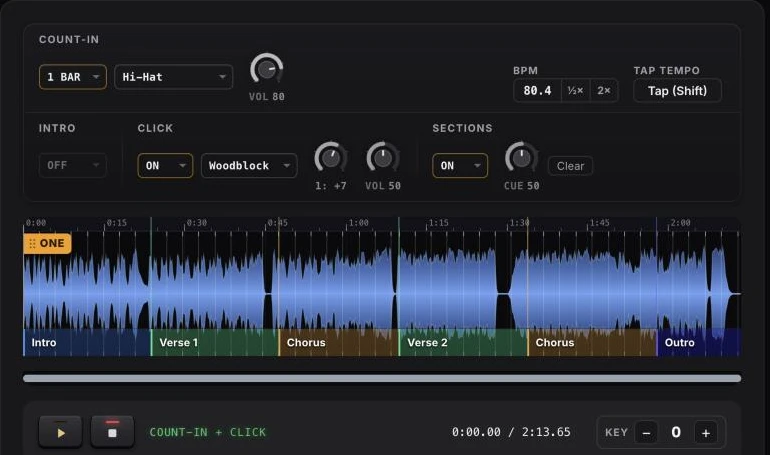
CountIn added spoken section cues on 14 November 2026. They work on a single file, an MP3, WAV, M4A, FLAC or OGG, with no stems and no session: the program measures every beat of the recording, the user marks where the sections start, and the export carries the names on the left channel beside the click.
| Step | Control | What happens |
|---|---|---|
| 1 | Upload | the tempo and every beat are measured; the orange marker ONE sits on beat one and can be dragged |
| 2 | CLICK, ON | a woodblock or stick sound on every measured beat, beat one tuned up |
| 3 | SECTIONS, ON | blocks appear along the bottom of the waveform, one division every eight bars, each reading Name this |
| 4 | Click a block | a menu of ten names: Intro, Verse, Pre-chorus, Chorus, Bridge, Solo, Instrumental, Break, Last chorus, Outro |
| 5 | Verse | numbered as it is added, 1 to 6, said as one phrase: Verse one, Verse two |
| 6 | Drag a name | the section moves to another bar; a click elsewhere in a block starts a new section there |
| 7 | CUE | the level of the voice next to the click, 0 to 100, set to 50 at the start |
| 8 | Play | the preview says the names; it is free and needs no account |
| 9 | Export | a stereo file: count-in, click and voice on the left, the song in mono on the right; the name ends in _count_in_click_cues_split |
Listening is free. The export with a click and cues is in the Click plan, 39 dollars a year. How the click itself is made from a finished recording is in a click track from your own backing track, and the wiring of the two channels in split click and backing track.
Where the word lands
Each name is one recording. It is placed so that its stressed part, not its first sound, falls on beat one of the bar before the section: the cho of Chorus, the one of Verse one.
| Name | Length of the recording | Stressed part begins |
|---|---|---|
| Intro | 0.56 s | 0.02 s |
| Verse | 0.49 s | 0.04 s |
| Verse one | 0.78 s | 0.38 s |
| Pre-chorus | 0.75 s | 0.26 s |
| Chorus | 0.64 s | 0.08 s |
| Bridge | 0.49 s | 0.08 s |
| Solo | 0.55 s | 0.06 s |
| Instrumental | 0.71 s | 0.02 s |
| Break | 0.52 s | 0.08 s |
| Last chorus | 0.90 s | 0.40 s |
| Outro | 0.47 s | 0.02 s |
Seconds of warning by tempo
One bar of four beats lasts 240 divided by the tempo, so the same cue arrives earlier in a slow song and later in a fast one.
| Tempo | One bar | Longest name, 0.90 s, as a share of the bar |
|---|---|---|
| 60 BPM | 4.00 s | 23% |
| 80 BPM | 3.00 s | 30% |
| 100 BPM | 2.40 s | 38% |
| 120 BPM | 2.00 s | 45% |
| 140 BPM | 1.71 s | 53% |
| 160 BPM | 1.50 s | 60% |
| 195 BPM | 1.23 s | 73% |
At 195 BPM a spoken count of four numbers gets 0.31 seconds a number, and the recorded numbers run from 0.38 to 0.46 seconds. CountIn says the name alone.
Where it does not apply
| Case | What happens |
|---|---|
| A phone, short side of the screen under 600 pixels | the SECTIONS control is not shown |
| CLICK is off | no cues; they ride on the click layer |
| A seventh verse | the number stops at six |
| A language other than English | one voice, English |
| A name outside the ten | not available |
On two recordings, at 126 and 131 BPM with seven sections each, the stressed part of every name fell within one millisecond of the bar line read from the beat grid. On seven recordings between 95 and 167 BPM the music channel of the export was identical, sample for sample, to an export without cues.
Frequently asked questions
What is a guide cue in a backing track?
A recorded voice that says the name of the next section, Verse, Chorus, Bridge, on the channel the band hears, usually one bar before the section. MultiTracks.com has published guide cues with its tracks since at least 2012 and re-recorded them in February 2019.
How far ahead is a guide cue spoken?
One measure in Playback, by default. One bar in CountIn, which is 3.00 seconds at 80 BPM and 1.50 seconds at 160 BPM.
Can guide cues be added to a single MP3?
In Playback the cues come from sections built on a song in the app. CountIn takes one audio file, MP3, WAV, M4A, FLAC or OGG, and writes the click and the names into a new stereo file.
Which channel carries the cues?
The left one, with the click, in a split file. That layout is older than the apps: the LiteTracks MP3 that MultiTracks.com sold in 2012 had the click on the left and the mix on the right.
Does the guide count after the name?
In Playback only when Count Into Each Section or Play Section Count In is on. In CountIn there is no count after the name.
How many section names are there?
Ten in CountIn, with verses numbered one to six. The 2019 update at MultiTracks.com added Post-Chorus, Rap and Turnaround to its list and numbered its choruses, pre-choruses and bridges.
Sources
- Wikipedia: Click track (edited 30 May 2026), In-ear monitor (edited 30 July 2026), Ableton Live.
- MultiTracks.com blog: Why Use Click and Guide Cues (1 May 2012), All About Worship interview with MultiTracks.com (20 August 2012), Dynamic Guide Cues in Ableton Live, Will Doggett (6 November 2014), Updated Song Sections and Guide Cues (18 February 2019).
- MultiTracks.com Help Center: How To, Cloud Song Guide Cues (29 June 2026); Guide Settings for Specific Song Sections.
- Worship Artistry: Tips for Giving Cues in Worship While Using Tracks.
If the backing track is on your computer, hear CountIn count it in on beat one. Listening is free and needs no account.
← Back to Blog · Click track · Free BPM finder · Tap tempo · Key changer