Karaoke Version Backing Tracks Live: Click, Count-In, Key and Cues
· 10 min read
The finished file, as a band hears it: thirteen seconds of the demo song Midnight by Smith Riff at 80 BPM, exported from CountIn. The left channel has the click and the voice that names the section, the right channel the music.
Records with one part left out for the buyer to play are older than karaoke: Irv Kratka founded Music Minus One in Westchester, New York, in 1950, and in 1971 Daisuke Inoue began renting eleven machines fitted with tapes and amplifiers to bars in Kobe. Karaoke Version carries the notice "Copyright © 2004-2026, Recisio" at the foot of every page; its licensing terms, last updated on 17 June 2026, name the licensor as Recisio SAS and place disputes before the courts of Lille. Recisio's own site says it serves "about 1 million users each month in 10 different languages". Every song page states how the recordings are made: "All the content on our website is entirely reproduced by our musicians in studio. We do not use any parts of the original recordings and do not make use of AI stem separation technology in any way."
If the backing track is on your computer, hear CountIn count it in on beat one. Listening is free and needs no account.
What a Custom Backing Track page shows
The page for 9 to 5, as made famous by Dolly Parton, read on 20 November 2026:
| Line on the page | Value |
|---|---|
| Tempo | "variable (around 105 BPM)" |
| Key | "In the same key as the original: F♯", with a Key selector at 0 |
| Duration | 03:07 |
| Format | "MP3 320 Kbps" |
| Price, seen from Poland | €2.99 |
| Rows in the mixer | 11 |
| Row | Controls |
|---|---|
| Intro count, Click | a tick box for the count; L, C, R; level; solo |
| Drum Kit | L, C, R; level; solo |
| Bass | L, C, R; level; solo |
| Rhythm Electric Guitar | L, C, R; level; solo |
| Arr. Electric Guitar | L, C, R; level; solo |
| Piano | L, C, R; level; solo |
| Brass section | L, C, R; level; solo |
| Sound effects (typewriter) | L, C, R; level; solo |
| Backing Vocals | L, C, R; level; solo |
| Lead Vocal (ad lib) | L, C, R; level; solo |
| Lead Vocal | L, C, R; level; solo |
Of the first 11 song pages listed under Custom Backing Track that day, 10 had a row named Click with an Intro count beside it, and 1, a Christmas medley, had neither. Three of the pages gave the tempo as variable, around 105, 141 and 150 BPM.
What the shop sets, and what it leaves
| Job | On Karaoke Version | In its own words |
|---|---|---|
| Click for the band only | the Click row has pan positions L, C and R | no sentence; the controls are on the song page |
| A count before the song | the Intro count box | "This option adds a pre-count click sound before the beginning of the song (useful for instance when the song starts a cappella)." |
| Key | up to 4 semitones each way | "You can change the key of an mp3 track by up to 4 semitones, both before and after the purchase." |
| Sound after a key change | stated | "You will notice that changing the pitch affects the sound quality." |
| Tempo | not offered | "It's not possible to change the tempo directly from our website." |
| Another mix of a bought song | free | "you can create and download as many different mixes as you like at no additional cost." |
| All stems at once | not offered | "you cannot download all individual tracks (stems) of a Custom Backing Track at the same time" |
| One stem | by muting the rest | "It will contain only the selected track." |
| Spoken section names | no such row on the 11 pages read | none found |
| File | MP3, or WAV made from it | "stereo files at 320kbps with a 16-bit depth and a sampling rate of 44.1 kHz"; "WAV files sold on our store are high-resolution MP3 converted to a lossless format." |
On 4 June 2025 the shop's blog returned to the key change under the title All About Pitch Change and Audio Quality on Karaoke Version. It says the shift "can slightly degrade the audio, especially on extreme pitch shifts, which can noticeably affect certain sounds and particularly bass tones", and for a better result it recommends "downloading your Custom Backing Track in its original key, then using your favorite DAW like Ableton or Logic to change the pitch."
A click-left file from the mixer alone
| Step | Row | Setting |
|---|---|---|
| 1 | Lead Vocal, Lead Vocal (ad lib) | level to zero, for a band with its own singer |
| 2 | Click | L |
| 3 | Intro count | ticked |
| 4 | the other eight rows | R |
| 5 | Key | 0 to 4 semitones up or down |
| 6 | Download | one stereo MP3 at 320 kbps |
That is ten pan settings on the 9 to 5 page, one for each row left sounding. The left channel of such a file goes to the in-ears and the right to the PA, the layout described in split click and backing track.
What is added to the downloaded file
CountIn works on the file after the download: one MP3, WAV, M4A, FLAC or OGG of up to 100 MB and 20 minutes. It measures every beat of the recording and writes a new stereo file.
| Case | On the shop's page | In CountIn |
|---|---|---|
| A page with no Click row, 1 of the 11 read | no click to pan | a click on every measured beat, beat one tuned higher |
| A tempo given as variable | the page states it | the click is placed beat by beat, not from one BPM figure |
| A key more than 4 semitones away | the limit is 4 | up to 7 each way, Rubber Band R3 engine with formant preservation |
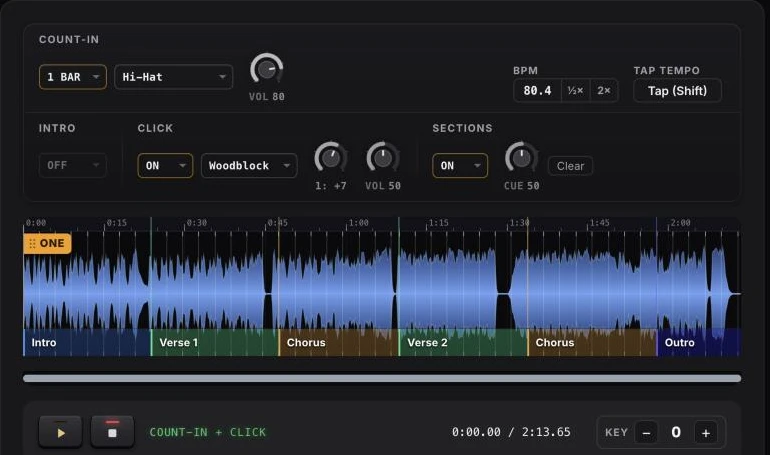
| Section names in the ears | no such row | Intro, Verse 1 to 6, Pre-chorus, Chorus, Bridge, Solo, Instrumental, Break, Last chorus, Outro, said one bar ahead |
| The count before the song | a pre-count click | 1 to 8 bars; hi-hat, sticks or a spoken count |
| Songs from several sources in one set | one level per file | every export matched to −14 LUFS |
A metronome set 1 BPM away from a song of 3:07 at about 105 BPM is 3 beats out by the last bar: 327 beats against 324.
Key first, click second
A pitch shift is applied to both channels of a stereo file. On a file that already carries the click on the left, the click moves with the band: at 2 semitones down, a click at 1,000 Hz comes out at 891 Hz, and at 4 down at 794 Hz. The order that avoids it:
| Step | Where | What |
|---|---|---|
| 1 | Karaoke Version mixer | Click row muted, Intro count unticked, every row at C, key at 0 |
| 2 | Karaoke Version | download the stereo mix |
| 3 | CountIn | upload; the tempo and beat one are measured |
| 4 | KEY | minus 7 to plus 7 semitones, tempo and length unchanged |
| 5 | COUNT-IN | 1 to 8 bars |
| 6 | CLICK, ON | a click on every measured beat |
| 7 | SECTIONS, ON | name the blocks along the waveform |
| 8 | Export | count-in, click and voice on the left, the song in mono on the right |
The preview of all of it is free and needs no account. An export with the count-in and the key change is in the Stage plan, 19 dollars a year; the click and the spoken cues are in the Click plan, 39 dollars a year. The cues are described in guide cues for backing tracks, and the choice of key in change the key of a song to fit your singer.
What the licence says about playing live
| Use | Karaoke Version help centre |
|---|---|
| No licence needed | "Live, one-time events that are not recorded or monetized." |
| Licence required | "Public performances that are recorded, broadcasted, or repeated." |
| On every song page | "Without expressed permission, all uses other than home and private use are forbidden." |
| Non-commercial licence, terms of 17 June 2026 | "For occasional public / live performances ( non-commercial / non-profit events)" |
The terms belong to the shop and to the file it sold. Adding a click or a count-in to the file does not change them.
Where it does not apply
| Case | What happens |
|---|---|
| A file over 100 MB or 20 minutes | CountIn does not take it |
| A change of tempo | neither the shop nor CountIn changes it |
| A song that starts a cappella | the count-in ends on the ONE marker, which is dragged to the first sung note; the shop's Intro count is offered for the same case |
| A name outside the ten section names | not available |
| A phone | the SECTIONS control is not shown on a screen under 600 pixels on its short side |
Frequently asked questions
Does every Karaoke Version Custom Backing Track have a click track?
Not every one. Of the first 11 song pages listed under Custom Backing Track on 20 November 2026, 10 had a Click row with an Intro count and 1, a medley, had neither.
Can the click be put on one side only?
The Click row on a song page has three pan positions, L, C and R, the same as every instrument row.
How far can Karaoke Version change the key?
"Up to 4 semitones, both before and after the purchase", in the words of its help centre, which adds: "You will notice that changing the pitch affects the sound quality." CountIn shifts a downloaded file by up to 7 semitones each way.
Can Karaoke Version change the tempo of a track?
No. The help centre says: "It's not possible to change the tempo directly from our website." CountIn does not change the tempo either.
Can all the stems be downloaded at once?
No: "you cannot download all individual tracks (stems) of a Custom Backing Track at the same time". One row can be downloaded by muting the others, and new mixes of a bought song cost nothing.
Can a Karaoke Version track be played at a gig?
The help centre lists "Live, one-time events that are not recorded or monetized" as needing no licence, and "Public performances that are recorded, broadcasted, or repeated" as needing one.
Sources
Pages read on 20 November 2026.
- Karaoke Version, Custom Backing Track listing and the song page of 9 to 5.
- Karaoke Version help centre: Can I modify the song key; I want to change the tempo of one of my songs; articles on downloading separate tracks and new mixes; Which karaoke file format is best for me; Can I use your instrumental tracks for public performances.
- Karaoke Version blog, All About Pitch Change and Audio Quality on Karaoke Version, 4 June 2025.
- Karaoke Version, Individual Licensing Agreement, last update 17 June 2026.
- Recisio, company site.
- Wikipedia: Music Minus One; Daisuke Inoue.
If the backing track is on your computer, hear CountIn count it in on beat one. Listening is free and needs no account.
← Back to Blog · Click track · Free BPM finder · Tap tempo · Key changer